顯示具有 Tips 標籤的文章。 顯示所有文章

2010年2月17日 星期三

AllTray + "app mode" of Google Chrome

以單純要收聽台灣的網路廣播就可以執行以下的命令
$ cat > .local/share/applications/hichannel.desktop <<ENDLINE
[Desktop Entry]
Name=hiChannel 網路廣播
Exec=alltray google-chrome --app=http://fd.idv.tw/radio/player.html
Icon=google-chrome
Type=Application
Categories=GTK;Application;AudioVideo;Audio;Player;
ENDLINE
然後就會在應用程式選單裡面看到
執行起來就像是
 還可以點選工具列中的圖示隱藏起來

或是想要使用微軟的 MSN Messenger 網頁版
 $ cat > .local/share/applications/msn.desktop <<ENDLINE
 [Desktop Entry]
Name=MSN Messenger 網頁版
Exec=alltray google-chrome --app=http://webmsn.msn.com.tw/wlml/index.htm?uri=webmsn.msn.com.tw
Icon=google-chrome
Type=Application
Categories=Network;InstantMessaging;
ENDLINE
不過相信目前應該沒有人會想要使用 MSN Messenger 網頁版
雖然它有機會做得更好更容易使用,不過目前的情況並不是這樣的 :P

總之就是 AllTray 跟 Google Chrome 的 "app mode" 搭配使用可以讓許多的網頁應用程式使用起來更像是本機上面的應用程式~ :)

2009年12月6日 星期日

在 Linux 系統上面合併多個 PDF 檔案成為一個 PDF 檔案

今天臨時興起想要去複習一下 Advanced Linux Programming 這本相當不錯的電子書
於是就把網頁上面的 PDF 檔案都下載回電腦裡面
這時候突然覺得要這樣分別開啟多個 PDF 檔案實在是麻煩
於是在網路上面找了一些方法
第一個方法是利用 ImageMagick 這個套件裡面的 convert 指令
$ convert alp-toc.pdf alp-ch*.pdf alp-ap*.pdf alp-index.pdf alp.pdf
不過製作出來的 alp.pdf 品質感覺不是很好
第二個方法是用 ghostscript 的 gs 指令
$ gs -dNOPAUSE -sDEVICE=pdfwrite -sOUTPUTFILE=alp.pdf -dBATCH alp-toc.pdf alp-ch*.pdf alp-ap*.pdf alp-index.pdf
製作出來的 alp.pdf 品質不錯,不過花了不少時間
第三個方法是用 pdftk 這個套件當中的指令 pdftk
$ pdftk alp-toc.pdf alp-ch*.pdf alp-ap*.pdf alp-index.pdf cat output alp.pdf
這個方法比之前的方法都要來的快速~
另外有網友提到可以使用看看 pdfsam 因為有太多相依上的套件要額外安裝就沒有想要繼續試下去啦~ :P

2009年8月26日 星期三

將 Subversion Repository 搬進 Google Code 裡面

由於 http://pcmanx.csie.net 的管理者 lwhsu 好像去玩國軍 Online 了
加上網頁一直無法更新還有常常會遇到網站掛點的狀況
所以動起了幫 PCManX GTK+ 搬家的念頭
以下是筆記將 Subversion Repository 搬進 Google Code 的過程
  1. 首先建立本地端的 mirror
    $ svnadmin create pcmanx
    $ cat <<'EOF' > pcmanx/hooks/pre-revprop-change
    #!/bin/sh
    USER="$3"
    if [ "$USER" = "svnsync" ]; then exit 0; fi
    echo "Only the svnsync user can change revprops" >&2
    exit 1
    EOF
    $ chmod +x pcmanx/hooks/pre-revprop-change
    $ svnsync init file://`pwd`/pcmanx https://svn.csie.net/pcmanx
    $ svnsync sync file://`pwd`/pcmanx
  2. 然後將 mirror 同步到 Google Code 上面
    $ svnsync init --username fourdollars https://pcmanx-gtk2.googlecode.com/svn file://`pwd`/pcmanx
    $ svnsync sync --username fourdollars https://pcmanx-gtk2.googlecode.com/svn
  3. 如果中途中斷遇到 lock 問題, 可以這樣解決, 不過要確定沒有人在使用該 Subversion Repository
    $ svn pdel --revprop -r 0 svn:sync-lock https://pcmanx-gtk2.googlecode.com/svn
    $ svnsync sync --username fourdollars https://pcmanx-gtk2.googlecode.com/svn
這樣就大功告成啦~ 以後如果有類似的狀況可以把粗體字的部份換掉就可以了~ :D

2009年8月22日 星期六

利用 caff 來加速 GPG sign 的過程

Debian Birthday Party 2009 in Taiwan 上面 PaulLiu 介紹了 GPG 簽章的過程
當中提到了為了防止有人偽造他人的 Email 所以我們在得到對方的 Finger Print 之後
進行簽署的過程當中的最後不應該直接把簽好的金鑰上傳到伺服器上面
反而是要使用對方的公鑰加密寄到對方的 Email 信箱當中
由對方去上傳你/妳已經簽署過的金鑰
而這之間的冗長又重覆的動作可以透過 signing-party 套件當中的 caff 來簡化這些動作
$ sudo apt-get install signing-party
例如你/妳拿到 $4 的金鑰的 Finger Print 後
D51B 8601 C9AE 0E87 A0BE  7795 BCB0 2784 A55D A068
然後執行
$ caff A55DA068
這樣就會自動從網路上面取得 $4 的公鑰, 然後進入 gpg command mode
Command> sign
Command> save
就會自動直接將加密好的文章跟簽署過的金鑰寄給我
(前提是你/妳已經設定好文字模式下的寄信方法, 像是上一篇 "利用 ssmtp 透過 Gmail 在文字模式下寄信" 所提的)

利用 ssmtp 透過 Gmail 在文字模式下寄信

sudo aptitude install ssmtp
然後編輯 /etc/ssmtp/ssmtp.conf 加入
AuthUser=user.name@gmail.com
AuthPass=password
FromLineOverride=YES
mailhub=smtp.gmail.com:587
UseSTARTTLS=YES
之後就可以透過 mailutils 套件中的 mail 指令來寄信
$ echo "This is a test mail." | mail -s "test mail" user.name@gmail.com
當在你/妳收到自己寄出來的信就可以確認是正常運作的

2009年8月17日 星期一

Commit your git changesets into Subversion

Commit your git changesets into Subversion
  • First prepare your Subversion target folder, ex. http://svn.example.com/svn/git-backup
    $ svn mkdir --parents http://svn.example.com/svn/git-backup
  • Configure your git-svn on your original git working folder.
    $ git-svn init http://svn.example.com/svn/git-backup
  • Fetch Subversion changesets.
    $ git-svn fetch
  • Manually graft relationship.
    $ git show-ref git-svn
    8ec71dda61a3a32d9cf0c00e51a0c1ca3ea39f0e refs/remotes/git-svn
    $ git log --pretty=oneline master | tail -n1
    bcbd25a12642e98e1c54a8e51abacd85222b79a7 Your latest git commit log.
    $ echo "bcbd25a12642e98e1c54a8e51abacd85222b79a7 8ec71dda61a3a32d9cf0c00e51a0c1ca3ea39f0e" >> .git/info/grafts
  • Then push all git changesets into Subversion repository.
    $ git-svn dcommit
With Standard Layout
  • First prepare your Subversion target folder, ex. http://svn.example.com/svn/git-backup/{trunk,branches,tags}
    $ svn mkdir --parents http://svn.example.com/svn/git-backup/trunk http://svn.example.com/svn/git-backup/branches http://svn.example.com/svn/git-backup/tags
  • Configure your git-svn on your original git working folder.
    $ git-svn init --stdlayout http://svn.example.com/svn/git-backup
  • Fetch Subversion changesets.
    $ git-svn fetch
  • Manually graft relationship.
    $ git show-ref trunk
    8ec71dda61a3a32d9cf0c00e51a0c1ca3ea39f0e refs/remotes/git-svn
    $ git log --pretty=oneline master | tail -n1
    bcbd25a12642e98e1c54a8e51abacd85222b79a7 Your latest git commit log.
    $ echo "bcbd25a12642e98e1c54a8e51abacd85222b79a7 8ec71dda61a3a32d9cf0c00e51a0c1ca3ea39f0e" >> .git/info/grafts
  • Then push all git changesets into Subversion repository.
    $ git-svn dcommit

2009年6月28日 星期日

apt-get/aptitude update 時 GPG error 問題的發生與尋找解決之道

剛剛在 Ubuntu 8.10 上執行
sudo aptitude update
時遇到一個錯誤訊息
W: GPG error: http://download.virtualbox.org intrepid Release: 下列的簽名皆不合法: BADSIG DCF9F87B6DFBCBAE Sun Microsystems, Inc. (xVM VirtualBox archive signing key) <info@virtualbox.org>
於是就到 http://www.virtualbox.org 上面去尋找 GPG 這個關鍵字
果然找到了一篇相關的 bug report 裡面提到一篇郵件清單上面的文章 apt-get update problem: GPG error ... The following signatures
were invalid

文章當中提到了
rm /var/lib/apt/lists/*
就可以解決問題了
可是我不想要把 /var/lib/apt/lists/ 底下的東西都刪光光
於是看了一下 /var/lib/apt/lists/ 底下
[前面省略]
archive.ubuntu.com_ubuntu_dists_intrepid_main_source_Sources
archive.ubuntu.com_ubuntu_dists_intrepid_Release
archive.ubuntu.com_ubuntu_dists_intrepid_Release.gpg
archive.ubuntu.com_ubuntu_dists_intrepid_restricted_source_Sources
download.virtualbox.org_virtualbox_debian_dists_intrepid_non-free_binary-i386_Packages
download.virtualbox.org_virtualbox_debian_dists_intrepid_Release
[後面也省略]
跟之前的錯誤訊息比較看起來只是 VirtualBox 的 Release 這個檔案缺少了相對應的 Release.gpg 檔案
於是就把 download.virtualbox.org_virtualbox_debian_dists_intrepid_non-free_binary-i386_Packages download.virtualbox.org_virtualbox_debian_dists_intrepid_Release 這兩個檔案刪除掉
重新執行
sudo aptitude update
結果問題就... 還是沒有解決... 冏rz

好吧... 重新找線索看看發現 /var/lib/apt/lists/ 底下有個唯一的目錄 partial 底下也有 VirtualBox 相關的檔案
partial/
|-- download.virtualbox.org_virtualbox_debian_dists_intrepid_Release
`-- download.virtualbox.org_virtualbox_debian_dists_intrepid_Release.gpg
那麼試試看把這兩個檔案也刪除掉再執行一次
sudo aptitude update
結果就... 成功地解決掉這個問題啦~ ^o^

再看看 partial 目錄底下還是空空的
不過 partial 上層的目錄底下就看到了
download.virtualbox.org_virtualbox_debian_dists_intrepid_non-free_binary-i386_Packages
download.virtualbox.org_virtualbox_debian_dists_intrepid_Release
download.virtualbox.org_virtualbox_debian_dists_intrepid_Release.gpg
看起來就是 Release 檔案有了相對應的 Release.gpg 檔案
所以才能夠正常地執行~ :-D

2009年5月25日 星期一

減少打字 ssh -p xxxx username@host.com -> ssh host

一般的情況下,要使用 Console 下的 ssh 連線到某台 server 會這樣下指令
ssh -p xxxx username@myhost.com
不過我們可以下更短的指令
ssh myhost
要做到上面這樣的方法是編輯 ~/.ssh/config 這個檔案加入
host myhost
    Hostname myhost.com
    User username
    Port xxxx

2009年5月18日 星期一

Vim 套用 Markdown syntax

Markdown 是一套類似 WIKI 語法,可以快速生成 HTML 文件的工具。
因為自己有在使用 Vim 去編輯 Markdown 的檔案
所以找了一下給 Markdown 使用的 syntax
下載回來後放在 ~/.vim/syntax 底下
然後再新增編輯 ~/.vim/filetype.vim
augroup filetypedetect
    au BufNewFile,BufRead *.mkd      setfiletype mkd
augroup END
這樣一來就可以指定 .mkd 副檔名的檔案都使用 Markdown 的 syntax
另外 Markdown 也是 GitHub 上面官方支援的文件格式之一

2009年5月4日 星期一

git format-patch --no-prefix -p

一般的 git diff 輸出長得像是這樣子
diff --git a/po/POTFILES.in b/po/POTFILES.in
index 6853012..baecc35 100644
--- a/po/POTFILES.in
+++ b/po/POTFILES.in
@@ -9,3 +9,4 @@ src/view/telnetview.cpp
 src/emoticondlg.cpp
 src/autologinpage.cpp
 src/downarticledlg.cpp
+src/pcmanx_gtk2.cpp
其中有 a/... b/... 實在不是很喜歡
改用 git diff --no-prefix 輸出就變成了
diff --git po/POTFILES.in po/POTFILES.in
index 6853012..baecc35 100644
--- po/POTFILES.in
+++ po/POTFILES.in
@@ -9,3 +9,4 @@ src/view/telnetview.cpp
 src/emoticondlg.cpp
 src/autologinpage.cpp
 src/downarticledlg.cpp
+src/pcmanx_gtk2.cpp
同樣的用法也可以使用在 git format-patch --no-prefix
From 66038b61719904c16147945d8c68a0773ef65846 Mon Sep 17 00:00:00 2001
From: jasonxh <jasonxh+c73c965c-c2fa-0310-9a63-82392b9be63f>
Date: Thu, 19 Feb 2009 05:58:15 +0000
Subject: [PATCH] 2009-02-18  Jason Xia  <jasonxh+gmail.com>

    * po/POTFILES.in, po/zh_CN.po, po/zh_TW.po: Update po files. Fix
    Simplified Chinese translation of "Line" and "Col".


git-svn-id: https://svn.csie.net/pcmanx/trunk@464 c73c965c-c2fa-0310-9a63-82392b9be63f
---
 ChangeLog           |    5 ++
 po/POTFILES.in      |    1 +
 po/zh_CN.po         |  174 +++++++++++++++++++++++++++------------------------
 po/zh_TW.po         |  167 +++++++++++++++++++++++++-----------------------
 src/pcmanx_gtk2.cpp |    2 +-
 5 files changed, 186 insertions(+), 163 deletions(-)

diff --git ChangeLog ChangeLog
index ffd2d02..ef74622 100644
--- ChangeLog
+++ ChangeLog
@@ -1,3 +1,8 @@
+2009-02-18  Jason Xia  <jasonxh+gmail.com>
+
+   * po/POTFILES.in, po/zh_CN.po, po/zh_TW.po: Update po files. Fix
+   Simplified Chinese translation of "Line" and "Col".
+
 2009-02-07  Youchen Lee  <copyleft+utcr.org>

    * src/mainframe.cpp: For availability to build under (gtk+ < 2.10),
diff --git po/POTFILES.in po/POTFILES.in
index 6853012..baecc35 100644
--- po/POTFILES.in
+++ po/POTFILES.in
@@ -9,3 +9,4 @@ src/view/telnetview.cpp
 src/emoticondlg.cpp
 src/autologinpage.cpp
 src/downarticledlg.cpp
+src/pcmanx_gtk2.cpp
不過 patch 檔前面會多一些統計資料也不是很喜歡
於是改用 git format-patch --no-prefix -p
From 66038b61719904c16147945d8c68a0773ef65846 Mon Sep 17 00:00:00 2001
From: jasonxh <jasonxh+c73c965c-c2fa-0310-9a63-82392b9be63f>
Date: Thu, 19 Feb 2009 05:58:15 +0000
Subject: [PATCH] 2009-02-18  Jason Xia  <jasonxh+gmail.com>

    * po/POTFILES.in, po/zh_CN.po, po/zh_TW.po: Update po files. Fix
    Simplified Chinese translation of "Line" and "Col".


git-svn-id: https://svn.csie.net/pcmanx/trunk@464 c73c965c-c2fa-0310-9a63-82392b9be63f

diff --git ChangeLog ChangeLog
index ffd2d02..ef74622 100644
--- ChangeLog
+++ ChangeLog
@@ -1,3 +1,8 @@
+2009-02-18  Jason Xia  <jasonxh+gmail.com>
+
+   * po/POTFILES.in, po/zh_CN.po, po/zh_TW.po: Update po files. Fix
+   Simplified Chinese translation of "Line" and "Col".
+
 2009-02-07  Youchen Lee  <copyleft+utcr.org>

    * src/mainframe.cpp: For availability to build under (gtk+ < 2.10),
diff --git po/POTFILES.in po/POTFILES.in
index 6853012..baecc35 100644
--- po/POTFILES.in
+++ po/POTFILES.in
@@ -9,3 +9,4 @@ src/view/telnetview.cpp
 src/emoticondlg.cpp
 src/autologinpage.cpp
 src/downarticledlg.cpp
+src/pcmanx_gtk2.cpp
因為老是會忘記這個用法,所以寫篇 blog 紀錄一下。:-P

2009年2月6日 星期五

在 Ubuntu 8.04.2 裡面設定自己的 git:// 分享給別人用

首先裝上 git-daemon-run
sudo aptitude install git-daemon-run
然後參考裡面的 /usr/share/doc/git-daemon-run/README.Debian

例如要將 /home/user/git/Project 這個已經是 git 的工作目錄分享出來
就執行
sudo ln -s /home/user/git/Project/.git /var/cache/git/Project.git
然後根據 Git Book - Setting Up A Public Repository 上面所提到的
要多做一個動作
touch /home/user/git/Project/.git/git-daemon-export-ok
最後就是重新啟動 git-daemon
sudo sv restart git-daemon
這樣別人就可以透過
git clone git://XXX.XXX.XXX.XXX/git/Project
來一起協同工作啦~ :D
這種方法在區域網路裡面分享程式碼特別快速方便~ ^o^

2008年10月20日 星期一

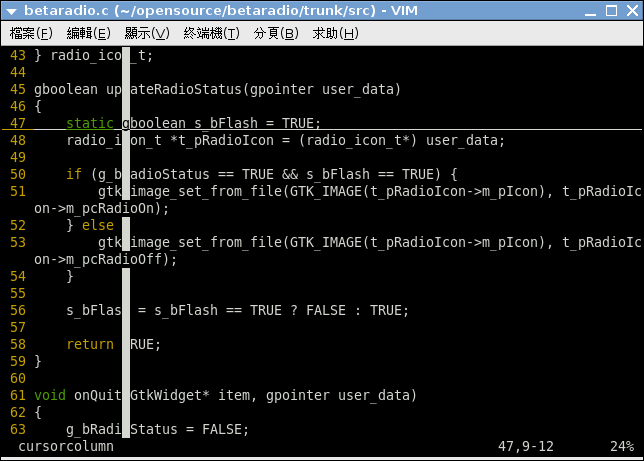
Vim :set cursorline :set cursorcolumn


剛剛增加了兩個快速鍵到 ~/.vimrc 當中
nmap <S-F11> :set cursorline!<BAR>set nocursorline?<CR>
nmap <S-F12> :set cursorcolumn!<BAR>set nocursorcolumn?<CR>
效果就有如上圖囉~ 有水平跟垂直的標線~ ^o^

2008年9月24日 星期三

利用程式碼註解來達成 #if #else #endif 的效果

下面這段 C 語言的程式碼
#include <stdio.h>

int main()
{
    //*/
    printf("If\n");
    /*/
    printf("Else\n");
    //*/
    return 0;
}
效果相當於
#include <stdio.h>

int main()
{
#if 1
    printf("If\n");
#else
    printf("Else\n");
#endif
    return 0;
}
如果把第一個註解改成 /*/ 後
#include <stdio.h>

int main()
{
    /*/
    printf("If\n");
    /*/
    printf("Else\n");
    //*/
    return 0;
}
效果就相當於
#include <stdio.h>

int main()
{
#if 0
    printf("If\n");
#else
    printf("Else\n");
#endif
    return 0;
}
這個小技巧也可以應用在其他可以使用 // /**/ 當作註解的程式語言

像是 Java 沒有 macro 可以使用,遇到 JNI 這類的東西,系統上就一定要安裝相關的 native library 才可以使用 JNI,如果在 JNI 上面加上一層空殼再搭配這樣的技巧就可以快速地在 native function 與 pseudo function 之間切換。

改寫之前寫過的 JNI - Java Native Interface
class HelloWorld
{
    // If '/*/' use native, '//*/' use pseudo.
    //*/
    public int[][] multiply(int A[][], int B[][]) { return null; }
    /*/
    public native int[][] multiply(int A[][], int B[][]);
    static
    {
        System.loadLibrary("HelloWorldImp");
    }
    //*/

    public static void main(String[] args)
    {
        HelloWorld test = new HelloWorld();
        int[][] A = new int[5][5];
        int[][] B = new int[5][5];
        int[][] result = test.multiply(A, B);
        System.out.println(result[0][0]);
    }
}
如果只是要開發一些跟 JNI 功能無關的 Java 程式部份,又不想要安裝或是無法安裝那些相依的 native library 的時候就很方便了。 ^o^

2008年7月8日 星期二

Vim 小技巧: 自動移除行尾多餘空白

在 $HOME/.vimrc 裡面加上
autocmd FileType c,cpp,java,php,perl,python,ruby,sh autocmd BufWritePre  :call setline(1,map(getline(1,"$"),'substitute(v:val,"\\s\\+$","","")'))
這樣就可以在每次存檔的時候,自動地把行尾多餘空白都移除掉囉~ 很好用吧~ ^~^

2008年7月6日 星期日

:help changelog

Vim 裡面有個組合鍵在寫 ChangeLog 的時候特別地好用
不過這個組合鍵只有在開啟 ChangeLog 這個檔案名稱才會起作用
組合鍵:
'\' + o

另外就是在 $HOME/.vimrc 可以指定使用者名稱
let changelog_username = "Shih-Yuan Lee (FourDollars) <fourdollars@gmail.com>"

有在寫 GNU Style ChangeLog 的人才會覺得這個功能好用吧~ :P

2008年6月19日 星期四

:help new-vimgrep

Vim 7.X 有一個相當實用的功能 vimgrep
相關的說明可以參考 :help new-vimgrep
我自己則是定義了三個快速鍵來使用
nmap <s-f9> viwy:vimgrep /\<<C-R>"\>/g **/*.[ch] **/*.[ch]pp **/*.java **/*.p[ly] **/*.rb<CR>
nmap <c-n> :cn
nmap <c-p> :cp
這樣就可以很方便地在 C/C++/Java/Perl/Ruby/Python 的程式碼樹當中快速搜尋關鍵字~
使用 Ctrl+n 來跳到後一個出現的地方
使用 Ctrl+p 來跳到前一個出現的地方
連 Google Search 都沒有這麼好用~ :P

:help new-vim-server

其實早在 Vim 6.X 的時候就有的一個功能
在 Ubuntu 8.04 上面要裝上 gvim 才能夠使用
就是先執行一個 vim 來當 server
vim --servername VIM file1.txt
然後再執行
vim --remote-tab file2.txt
就可以把 file2.txt 開個 tab 在前面那個 vim-server 裡面了~
詳細的說明可以參考 :help new-vim-server