顯示具有 InternetRadio 標籤的文章。 顯示所有文章

2010年1月17日 星期日

Google Chrome Extension: Taiwan Radio Tuner

這個 Google Chrome Extension 算是 BetaRadio 開發過程中的一個副產品
下載的網址在 https://chrome.google.com/extensions/detail/hacebidkncpkfenhpapdbkcefalehepa
使用說明整理在 http://code.google.com/p/betaradio/wiki/GoogleChromeExtension
希望大家會喜歡使用~ ;)

2010年1月9日 星期六

在 Ubuntu 8.04.3 可以使用 Google Chrome 瀏灠器來聽網路廣播~ ;)

延續上一篇文章 在 Ubuntu 8.04.3 用 Firefox 瀏灠器就可以聽網路廣播了~ :D
如果是想要在 Ubuntu 8.04.3 上面使用 Google Chrome 來收聽網路廣播的話
就要另外安裝 mozilla-mplayer 這個套件才行
然後連到 http://fd.idv.tw/radio/player.html
或者是直接安裝使用 Google Chrome Extension
http://fd.idv.tw/radio/hichannel.crx
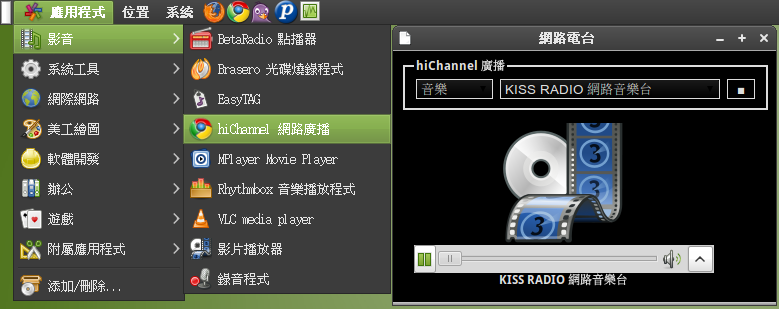
又或者是增加一個檔案 ~/.local/share/applications/hichannel.desktop
內容填上
[Desktop Entry]
Name=hiChannel 網路廣播
Exec=google-chrome --app=http://fd.idv.tw/radio/player.html
Icon=google-chrome
Type=Application
Categories=GTK;Application;AudioVideo;Audio;Player;
這樣就是一個(偽)不用開網頁瀏灠器也可以聽網路廣播的應用程式了~ :P

2010年1月8日 星期五

在 Ubuntu 8.04.3 用 Firefox 瀏灠器就可以聽網路廣播了~ :D

要在 Ubuntu 8.04.3 底下的 Firefox 3.0.17 聽網路廣播
只安裝好 gstreamer0.10-plugins-bad, gstreamer0.10-plugins-ugly, gstreamer0.10-ffmpeg 這幾個套件
然後連到 http://fd.idv.tw/radio/player.html 就可以聽了~

Mac OS X 10.4+ 上面要裝 Flip4Mac WMV Components for QuickTime
然後用 Safari 就可以聽了~

在 Windows 上面開 IE7/IE8/Safari/Opera/Firefox/Google Chrome 都可以聽~

另外寫了一個給 Google Chrome 用的 Extension
http://fd.idv.tw/radio/hichannel.crx

Have Fun~ ^o^

P.S. 誠徵 Icon 設計師幫小弟做出 Google Chrome Extension 要使用的 Icon 尺寸分別是 19x19/32x32/48x48/128x128 的 PNG