顯示具有 Firefox 標籤的文章。 顯示所有文章

2011年3月23日 星期三

給 Ubuntu 10.04/10.10 使用的 Firefox 5.0 PPA

Firefox 5.0 出來啦~ Ubuntu 10.04/10.10 的使用者有 PPA 可以用喔~

PPA 的位置在 ppa:mozillateam/firefox-stable 可以在軟體來源的其它軟體加上然後更新系統

或是使用終端機介面輸入
sudo add-apt-repository ppa:mozillateam/firefox-stable
sudo apt-get update && sudo apt-get upgrade

中文語言包也被 ppa:mozillateam/firefox-stable 包進去了,直接更新就可以使用了。

2010年2月17日 星期三

Firefox 擴充套件 ScribeFire 3.5 的錯誤解決方法

在 ScribeFire 升級到 3.5 後就無法正常啟動使用了
稍為 Google 了一下找到日本網友有提供解決的方法
http://uratene.sblo.jp/category/811798-1.html
http://fxwiki.blog63.fc2.com/blog-entry-246.html
過程就是到該套件的目錄底下 Linux 系統應該會在 ~/.mozilla/firefox/XXXXXXXX.default/extensions/{F807FACD-E46A-4793-B345-D58CB177673C} 底下
進入子目錄 chrome 底下解開 scribefire.jar
$ unzip scribefire.jar
然後修改 locale/zh-TW/overlay.dtd 裡面的內容
將 123, 124 行的
<!ENTITY performancing.editor.bar.strong.tt "強烈標示 <Strong>">
<!ENTITY performancing.editor.bar.em.tt "特別強調 <em>">
改成
<!ENTITY performancing.editor.bar.strong.tt "強烈標示 &lt;Strong&gt;">
<!ENTITY performancing.editor.bar.em.tt "特別強調 &lt;em&gt;">
然後更新壓縮檔 scribefire.jar
$ zip -r scribefire.jar content locale skin
再重新啟動 firefox 就可以了~

2010年1月22日 星期五

在 Linux 系統上面手動安裝 Firefox 3.6

首先到 http://www.mozilla.com/ 下載 firefox-3.6.tar.bz2 回來
然後解壓縮到 /usr/local/lib/firefox-3.6 底下
$ mkdir -p /usr/local/lib
$ tar xf firefox-3.6.tar.bz2 -C /usr/local/lib
$ mv /usr/local/lib/firefox /usr/local/lib/firefox-3.6
然後建立一個啟動圖示
$ mkdir -p .local/share/applications/
$ cat > .local/share/applications/firefox-3.6.desktop <<ENDLINE
[Desktop Entry]
Version=3.6
Name=Firefox 3.6 網頁瀏灠器
Comment=瀏灠網頁
GenericName=網頁瀏灠器
Exec=/usr/local/lib/firefox-3.6/firefox %u
Terminal=false
X-MultipleArgs=false
Type=Application
Icon=/usr/local/lib/firefox-3.6/chrome/icons/default/default48.png
Categories=Application;Network;
MimeType=text/html;text/xml;application/xhtml+xml;application/xml;application/vnd.mozilla.xul+xml;application/rss+xml;application/rdf+xml;image/gif;image/jpeg;image/png;
StartupWMClass=Firefox
StartupNotify=true                                                                                                                                                                                              
ENDLINE
這樣就可以了~ :D

2010年1月8日 星期五

在 Ubuntu 8.04.3 用 Firefox 瀏灠器就可以聽網路廣播了~ :D

要在 Ubuntu 8.04.3 底下的 Firefox 3.0.17 聽網路廣播
只安裝好 gstreamer0.10-plugins-bad, gstreamer0.10-plugins-ugly, gstreamer0.10-ffmpeg 這幾個套件
然後連到 http://fd.idv.tw/radio/player.html 就可以聽了~

Mac OS X 10.4+ 上面要裝 Flip4Mac WMV Components for QuickTime
然後用 Safari 就可以聽了~

在 Windows 上面開 IE7/IE8/Safari/Opera/Firefox/Google Chrome 都可以聽~

另外寫了一個給 Google Chrome 用的 Extension
http://fd.idv.tw/radio/hichannel.crx

Have Fun~ ^o^

P.S. 誠徵 Icon 設計師幫小弟做出 Google Chrome Extension 要使用的 Icon 尺寸分別是 19x19/32x32/48x48/128x128 的 PNG

2009年7月13日 星期一

在 Ubuntu 8.10 (intrepid) 上面安裝 Firefox 3.5

LaunchPad 上面有個 Ubuntu Mozilla Daily Build Team
裡面就有 PPA 可以用了
所以接下來的動作就很簡單了
首先是取得該 PPA 使用的  GPG public key
sudo apt-key adv --keyserver keyserver.ubuntu.com --recv-keys 247510BE
然後執行 sudo apt-key list 就可以看到多下面這個資訊
pub   1024R/247510BE 2009-02-05
uid                  Launchpad PPA for Ubuntu Mozilla Daily Build Team
接下來把該 PPA 的 sources.list 內容抄到 /etc/apt/sources.list.d/ 底下的 ubuntu-mozilla-daily.list
deb http://ppa.launchpad.net/ubuntu-mozilla-daily/ppa/ubuntu intrepid main
deb-src http://ppa.launchpad.net/ubuntu-mozilla-daily/ppa/ubuntu intrepid main
最後就是使用 APT 的前端程式來安裝囉
sudo aptitude update
sudo aptitude install firefox-3.5
這個方法同時支援 Ubuntu 8.04/8.10 只是換掉 codename (intrepid 換成 hardy) 而已~
至於 Ubuntu 9.04 的官方套件庫裡面已經有放 firefox-3.5
不過目前安裝起來都還是有英文版
所以還要下載中文語系包 http://releases.mozilla.org/pub/mozilla.org/firefox/releases/3.5/linux-i686/xpi/zh-TW.xpi
這樣就大功告成啦~ :-D

2008年10月20日 星期一

Flash 的方塊字問題

在網路上面常常看到有人提供解決 Ubuntu 8.04.1 上面 Flash 中文方塊字的問題
方法都是把 /etc/fonts/conf.d/49-sansserif.conf 這個檔案給刪除掉
反正 /etc/fonts/conf.d/49-sansserif.conf 本身只是一個 soft link
刪除掉也不會怎麼樣大不了再從 /etc/fonts/conf.avail/49-sansserif.conf 弄回來就好了
可是這樣的解決方法雖然可以看到 Flash 上面的中文字了
但是在 Pidgin 上面的中文字反而就變形了
於是我提供另一個解決方法是
把 /etc/fonts/conf.d/49-sansserif.conf 當中的
<edit name="family" mode="append_last">
    <string>sans-serif</string>
</edit>
改成
<edit name="family" mode="append_last">
    <string>AR PL UMing TW</string>
</edit>
讓系統將 sans-serif/serif/monospace 以外的字型全部預設成 AR PL UMing TW
而不是原本的 sans-serif 這樣就暫時解決掉這個問題了
目前還沒有看到什麼 side effect

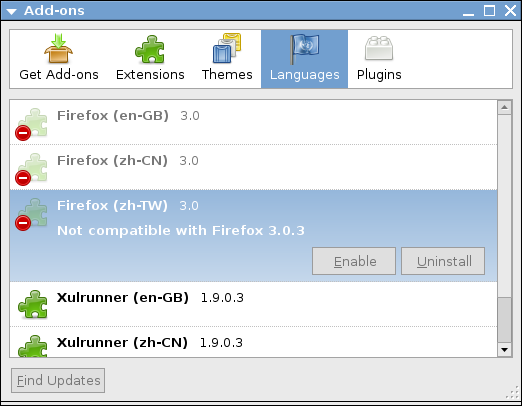
Firefox (zh-TW) 3.0 - Not compatible with Firefox 3.0.3


在 Ubuntu 8.04.1 上面的解決方法是
將 /usr/lib/firefox-addons/extensions/langpack-zh-TW@firefox-3.0.ubuntu.com/install.rdf 當中的
<em:maxVersion>3.0</em:maxVersion>
改成
<em:maxVersion>3.0.3</em:maxVersion>

2008年1月7日 星期一

Adobe Flash Player version 9,0,115,0

最近發現到 Adobe Flash Player 在 Linux 上的 Firefox/Iceweasel 的選單介面不再出現亂碼了~
而且介面看起來也變漂亮多了~ 在網址列中輸入 about:plugins 發現使用的 Adobe Flash Player plugin 版本是 9,0,115,0
後來到 http://www.adobe.com/products/flash/about/ 看到 Windows/Mac OS X/Linux 三個平台上面的 flash 都是一樣新的版本~ (至少在寫這篇文章的時候是這樣的)
真是可喜可賀啊~ :-D

2007年5月4日 星期五

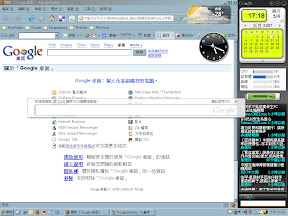
Windows + Firefox + Google

寄件者 Google

Firefox 跟 Google 讓原本不怎麼好用的 Windows XP 的桌面環境變得更好用了

2006年11月5日 星期日

Tab Catalog | Firefox Add-ons | Mozilla Corporation

Firefox 上好用的分頁預覽的附加元件,一圖勝千言... :P

2006年4月19日 星期三

Google Toolbar 2.0.20060404 for Firefox 1.5.0.2

在 Firefox 1.5.0.2 的 [擴充套件] 中按下 [尋找更新] 並不會把原本的 Google Toolbar 1.0.20051122 給升級到 Google Toolbar 2.0.20060404

必須要移除掉, 然後去 Google 下載重裝一次才會有新版的 Google Toolbar

現在是 2.0 版喔~ 你用的是 2.0 版嗎!? 還是你還在用 1.0 版勒~ :P

2005年10月6日 星期四

一起來學哈利波特耍魔法棒吧~~~ XD

天啊~~~ 我愛死這個功能了~~~ XD

Firefox 擴充套件 Top 15: "NO.5 All-in-One Gestures Extension"