最近 GNOME 有推出個 Become a Foundation member 的活動,如果以前對 GNOME 做過不少貢獻就可以去申請成為會員,當然還要經過審核通過,我個人一直都是以開發者路線為主的,所以就是透過程式碼的貢獻拿到這個會員,然後就會得到一個 [at] gnome [dot] org 的 Email address alias,還會有什麼投票的權利,姓名也會出現在 Membership - GNOME 上面,應該還有一些額外的東西,不過我暫時還沒有空全部找出來,就只好先把 Email address alias 設定好,跟 Debian developer 一樣先擺著,現在寄信到 sylee [at] gnome [dot] org 也可以找到我,多了一個身份不曉得以後送 patch 會不會比較方便一些,就醬囉。
2017年6月19日 星期一


2013年7月31日 星期三
Linux 電源供應的系統資訊
在筆記型電腦或是使用藍牙裝置時,系統上面都會有電源供應的資訊。
只要在 /sys/devices 底下找尋 power_supply 的目錄就可以找到。
如下所示:
u@u:/sys/devices$ find -name power_supply | while read path; do ls -l $(dirname $path); done
total 0
lrwxrwxrwx 1 root root    0 Jul 31 17:42 driver -> ../../../../../../../../../../bus/hid/drivers/apple
drwxr-xr-x 3 root root    0 Jul 31 17:38 hidraw
-r--r--r-- 1 root root 4096 Jul 31 17:42 modalias
drwxr-xr-x 2 root root    0 Jul 31 17:39 power
drwxr-xr-x 3 root root    0 Jul 31 17:39 power_supply
-r--r--r-- 1 root root 4096 Jul 31 17:42 report_descriptor
lrwxrwxrwx 1 root root    0 Jul 31 17:38 subsystem -> ../../../../../../../../../../bus/hid
-rw-r--r-- 1 root root 4096 Jul 31 17:38 uevent
total 0
lrwxrwxrwx 1 root root    0 Jul 31 17:42 driver -> ../../../../../../../../../../bus/hid/drivers/magicmouse
drwxr-xr-x 3 root root    0 Jul 31 17:39 hidraw
-r--r--r-- 1 root root 4096 Jul 31 17:42 modalias
drwxr-xr-x 2 root root    0 Jul 31 17:39 power
drwxr-xr-x 3 root root    0 Jul 31 17:39 power_supply
-r--r--r-- 1 root root 4096 Jul 31 17:42 report_descriptor
lrwxrwxrwx 1 root root    0 Jul 31 17:39 subsystem -> ../../../../../../../../../../bus/hid
-rw-r--r-- 1 root root 4096 Jul 31 17:39 uevent
total 0
lrwxrwxrwx 1 root root    0 Jul 31 17:42 driver -> ../../../../../../bus/acpi/drivers/battery
-r--r--r-- 1 root root 4096 Jul 31 17:42 hid
-r--r--r-- 1 root root 4096 Jul 31 17:42 modalias
-r--r--r-- 1 root root 4096 Jul 31 17:42 path
drwxr-xr-x 2 root root    0 Jul 31 17:39 power
drwxr-xr-x 3 root root    0 Jul 31 17:36 power_supply
lrwxrwxrwx 1 root root    0 Jul 31 17:36 subsystem -> ../../../../../../bus/acpi
-rw-r--r-- 1 root root 4096 Jul 31 17:36 uevent
total 0
lrwxrwxrwx 1 root root    0 Jul 31 17:42 driver -> ../../../../../../bus/acpi/drivers/ac
-r--r--r-- 1 root root 4096 Jul 31 17:42 hid
-r--r--r-- 1 root root 4096 Jul 31 17:42 modalias
-r--r--r-- 1 root root 4096 Jul 31 17:42 path
drwxr-xr-x 2 root root    0 Jul 31 17:39 power
drwxr-xr-x 3 root root    0 Jul 31 17:36 power_supply
lrwxrwxrwx 1 root root    0 Jul 31 17:36 subsystem -> ../../../../../../bus/acpi
-rw-r--r-- 1 root root 4096 Jul 31 17:36 uevent
所以可以從 driver 這個 symbolic link 看出每個電源供應是屬於哪些裝置。
另外也可以使用指令來監測 udev 裡面關於 power_supply 的訊息。
如下所示:
u@u:~$ udevadm monitor --subsystem-match=power_supply
monitor will print the received events for:
UDEV - the event which udev sends out after rule processing
KERNEL - the kernel uevent

KERNEL[65.358427] change   /devices/pci0000:00/0000:00:1a.0/usb3/3-1/3-1:1.0/bluetooth/hci0/hci0:13/0005:05AC:030D.0002/power_supply/hid-AB:CD:EF:12:34:56-battery (power_supply)
UDEV  [65.398449] change   /devices/pci0000:00/0000:00:1a.0/usb3/3-1/3-1:1.0/bluetooth/hci0/hci0:13/0005:05AC:030D.0002/power_supply/hid-AB:CD:EF:12:34:56-battery (power_supply)
KERNEL[81.032204] change   /devices/LNXSYSTM:00/device:00/PNP0A08:00/device:0c/PNP0C0A:00/power_supply/BAT1 (power_supply)
UDEV  [81.033615] change   /devices/LNXSYSTM:00/device:00/PNP0A08:00/device:0c/PNP0C0A:00/power_supply/BAT1 (power_supply)
最後就是 Freedesktop 有一個 UPower 專案,專門用來提供底層電源資訊的介面給桌面應用程式來使用。
如果是在 GNOME 桌面環境底下就是 gnome-settings-daemon 與 gnome-power-manager 透過 DBus 來使用 UPower 以提供圖形介面給桌面使用者使用。
2012年1月16日 星期一
Genie 程式語言
Genie 程式語言是 GNOME 計畫下的一個新的程式語言,跟 Vala 一起開發的,語法類似 Python,跟 Vala 一樣都是借助 GObject 來實現物件導向程式設計,也跟 Vala 一樣都是產生出 C 的程式碼,而且也因為 GObject 的關係可以輕易地產生其它程式語言的 binding。
例如:輸入以下的程式碼儲存成 hello.gs
例如:輸入以下的程式碼儲存成 hello.gs
init
        print "Hello World"
然後再執行以下的指令就可以看到結果了。$ valac hello.gs $ ./hello如果說要看到中間轉譯出來的 C 語言程式碼可以輸入以下指令:
$ valac -C hello.gs於是就可以看到 hello.c 產生出來了。
/* hello.c generated by valac 0.14.0, the Vala compiler
 * generated from hello.gs, do not modify */

#include <glib.h>
#include <glib-object.h>
#include <stdlib.h>
#include <string.h>

void _vala_main (gchar** args, int args_length1);

void _vala_main (gchar** args, int args_length1) {
        g_print ("Hello World\n");
}

int main (int argc, char ** argv) {
        g_type_init ();
        _vala_main (argv, argc);
        return 0;
}
看看裡面的內容是不是一般所熟悉的 C 語言程式碼。:)參考資料:Genie - GNOME Live!
2009年11月14日 星期六
GNOME Global Menu
官方網站 http://code.google.com/p/gnome2-globalmenu/
首先看一下使用前

面板上面並沒有加入很多應用程式的啟動圖示
所以在右上角有一塊區域一直沒有使用到
首先新增加 GNOME Global Menu 的 GPG Key

最後調整 GNOME Global Menu 的設定

於是就把 GTK+ 的選單列都移動到面板上面了~ :D

首先看一下使用前
面板上面並沒有加入很多應用程式的啟動圖示
所以在右上角有一塊區域一直沒有使用到
首先新增加 GNOME Global Menu 的 GPG Key
wget http://gnome2-globalmenu.googlecode.com/files/GlobalMenuKey.gpg然後新增一個檔案在 /etc/apt/sources.list.d/gnome2-globalmenu.list
sudo apt-key add GlobalMenuKey.gpg
# gnome2-globalmenu然後在面板上面增加一個 Applet
deb http://ppa.launchpad.net/globalmenu-team/ppa/ubuntu jaunty main
deb-src http://ppa.launchpad.net/globalmenu-team/ppa/ubuntu jaunty main
最後調整 GNOME Global Menu 的設定
於是就把 GTK+ 的選單列都移動到面板上面了~ :D
2008年9月23日 星期二
網路印表機設定 : Ricoh Aficio 2022
- 首先到 http://www.linuxprinting.org/show_printer.cgi?recnum=Ricoh-Aficio_2022 把 pxlmono 的 Custom PPD 檔案下載回來準備等一下使用
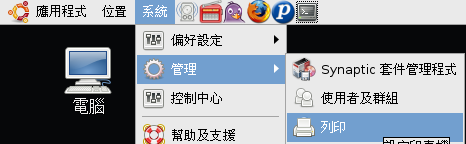
- 接下來打開 GNOME 裡面的印表機設定 [系統] -> [管理] -> [列印]
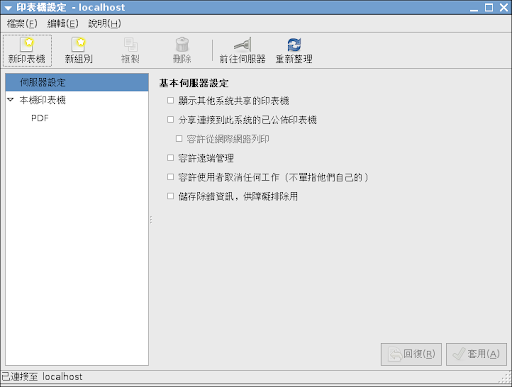
- 選擇 [新印表機]
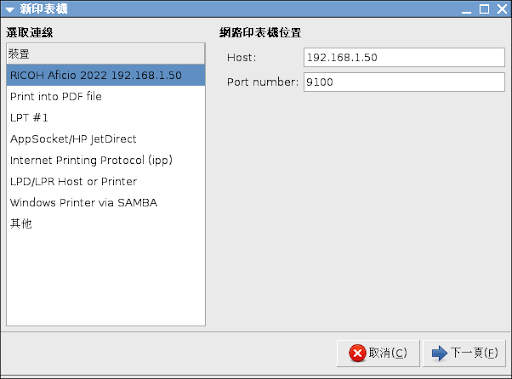
- 找到 Ricoh Aficio 2022 192.168.1.50 後點選下一頁
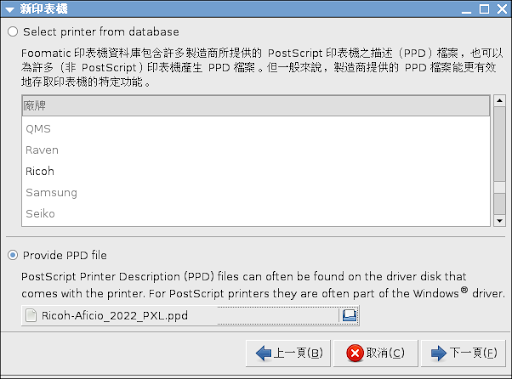
- 選取 [Provide PPD file] 使用剛剛下載回來的 PPD
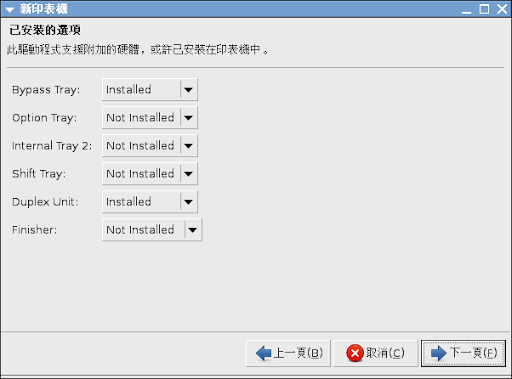
- 然後把 [Bypass Tray] 手動送紙匣 跟 [Duplex Unit] 雙面列印 都打開後就選取 [下一頁]
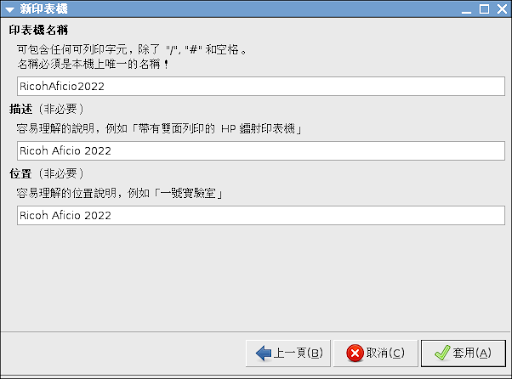
- 然後為印表機取個名稱再選取 [套用] 就可以了
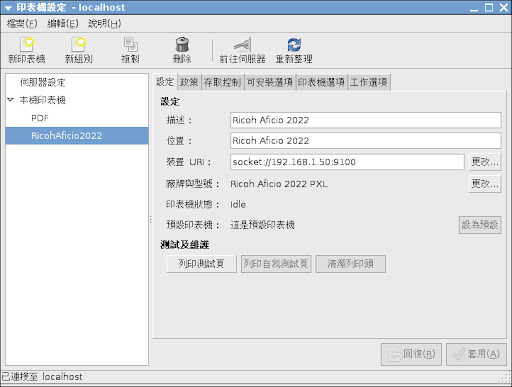
- 最後設定完成的樣子
2008年9月19日 星期五
手動在 GNOME 中建立 Eclipse 的選單圖示
目前官方的最新版本是 Eclipse 3.4 (Ganymede)
可是在 Ubuntu Hardy 8.04.1 下面預設的 Eclipse 版本只有到 3.2.2
解開後會出現一個 eclipse 的目錄
然後再增加一個檔案 ~/.local/share/applications/eclipse.desktop
可是在 Ubuntu Hardy 8.04.1 下面預設的 Eclipse 版本只有到 3.2.2
$ apt-cache policy eclipse於是就到官方網站上面直接下載 eclipse-java-ganymede-linux-gtk.tar.gz
eclipse:
已安裝:(沒有)
候選:3.2.2-5ubuntu2
版本表格:
3.2.2-5ubuntu2 0
500 http://tw.archive.ubuntu.com hardy/universe Packages
解開後會出現一個 eclipse 的目錄
然後再增加一個檔案 ~/.local/share/applications/eclipse.desktop
[Desktop Entry]這樣就可以在不影響系統環境的情況下建立一個自己使用的 Eclipse 3.4 的選單圖示囉~ ^o^
Name=Eclipse
Exec=/home/user/eclipse/eclipse
Icon=/home/user/eclipse/plugins/org.eclipse.platform_3.3.100.v200806172000/eclipse48.png
Terminal=false
Type=Application
Categories=Development;
StartupNotify=true
2007年9月2日 星期日

訂閱:
文章 (Atom)